
Introduction
When comparing 16:9 vs 16:10, the difference may seem small—but it can significantly impact your daily experience.
Here’s the quick answer:
– 16:9 is better for watching videos and gaming, because it matches most modern content.
– 16:10 is better for work and productivity, thanks to its extra vertical screen space.
So which one should you choose?
In this guide, we’ll break down the key differences, real-world use cases, and help you decide which aspect ratio fits your needs—whether you’re working, gaming, or designing LED display projects.
What Is 16:10 Aspect Ratio?
The 16:10 aspect ratio means the screen is 16 units wide for every 10 units high. In terms of real-world use, that extra height—compared to 16:9—gives you more vertical space. That’s especially helpful when working with documents, editing code, or managing multiple windows.
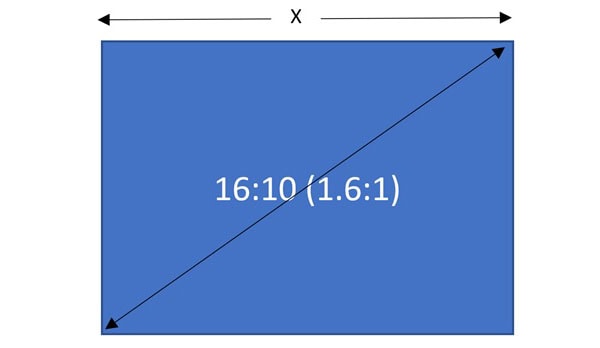
Common 16:10 Resolutions:
- 1920×1200
- 2560×1600
- 1440×900
This format was very popular in the late 2000s, especially in business laptops and professional monitors. While it briefly faded as 16:9 took over due to HDTV production standards, 16:10 is making a comeback in 2025, especially in premium laptops like:
- MacBook Pro
- Dell XPS 13 and 15
- HP Spectre x360
Why? Because professionals and creators value that extra screen real estate for daily workflows.
What Is 16:9 Aspect Ratio?
The 16:9 aspect ratio is currently the most common format for screens. It also means 16 units of width for every 9 units of height, making it slightly wider and shorter than 16:10.
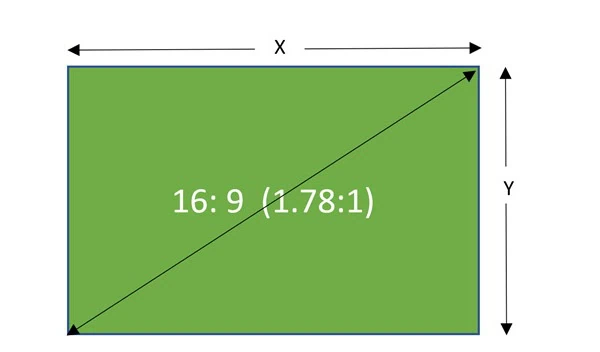
Common 16:9 Resolutions:
- 1920×1080 (Full HD)
- 3840×2160 (4K UHD)
- 1366×768 (budget laptops)
16:9 became dominant mainly because it matched the standard for HD television and video content. Manufacturers shifted to 16:9 panels due to lower production costs and wide compatibility with games, movies, and video platforms like YouTube and Netflix.
In short, if you’re buying a screen today, chances are it’s 16:9 by default—unless you intentionally go for 16:10. That’s why most users default to 16:9—unless they specifically need more vertical space for work.
16:9 vs 16:10 Aspect Ratio – Quick Comparison
Before diving into detailed explanations, here’s a quick side-by-side comparison to help you understand the main differences at a glance. This table summarizes the key aspects of 16:9 and 16:10 aspect ratios, from display size to user experience.
| Feature | 16:9 Aspect Ratio | 16:10 Aspect Ratio |
| Screen Shape | Wider, shorter | Slightly taller |
| Common Resolution Examples | 1920×1080 (Full HD), 3840×2160 (4K) | 1920×1200, 2560×1600 |
| Content Compatibility | Best for movies, TV shows, and gaming | Better for productivity and vertical space |
| Field of View in Games | Wider view, more immersive for gamers | Slightly narrower, but still usable |
| Vertical Screen Real Estate | Less | More — ideal for coding, editing, spreadsheets |
| Monitor Availability | Most common in consumer monitors | More common in professional or business monitors |
| Price & Availability | Widely available and often cheaper | Fewer options, may cost slightly more |
16:9 vs 16:10: Key Differences Explained
The aspect ratio directly affects the shape and usability of your screen. Below is a comprehensive comparison to help you understand how 16:9 and 16:10 differ across multiple dimensions.
Screen Shape and Usable Vertical Space
- 16:9 has a wider and shorter appearance, making it ideal for horizontal content like movies and games.
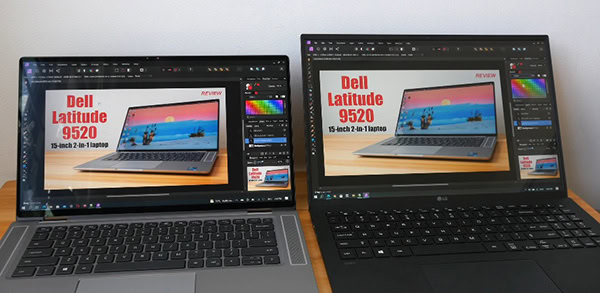
- 16:10 offers more vertical height, providing slightly more vertical screen real estate—especially noticeable when viewing documents, websites, or code.
For example, on a 24-inch monitor:
- A 16:9 screen has a resolution of 1920×1080 (Full HD), with 1080 vertical pixels.
- A 16:10 screen has 1920×1200 pixels—an extra 120 vertical pixels.
This additional height means fewer scrolls when reading or working in split-screen mode. Here is a video to help you see their difference more directly.
Watch this quick comparison to see the real difference between 16:9 and 16:10 in action:
Media & Entertainment Compatibility
- 16:9 is the global standard for TV shows, YouTube videos, games, and streaming platforms. Almost all digital video content is created in 16:9.
- 16:10 content often gets letterboxed (black bars on top and bottom), making it less ideal for watching videos.
Verdict: If you consume a lot of video content or play modern games, 16:9 gives you a seamless, full-screen experience.
Productivity & Work Use
- 16:10shines in professional and productivity-focused settings. The taller screen lets you:
-View more lines of code or text in IDEs and documents.
-Work more comfortably in apps like Excel, AutoCAD, or Figma.
-Reduce the need to scroll during research or web design.
- 16:9, while common in office setups, offers less vertical space, which can feel cramped for intensive tasks like video editing timelines or multi-tab browsing.
Pixel Density and Resolution Options
- Both aspect ratios support high-resolution formats (e.g., 1920×1080 vs 1920×1200, 2560×1440 vs 2560×1600, and even 3840×2160 vs 3840×2400).
- However, 16:10 displays often cost slightly more for the same diagonal size due to their extra pixel rows and lower market demand.
Laptop and Monitor Availability
- 16:9 dominates the consumer market—offering more variety, lower prices, and better availability.
- 16:10 is more common in premium laptops(like MacBooks, Dell XPS, ThinkPad T-series) and professional monitors.
Some brands now shift back to 16:10 for better ergonomics, especially in business and creator laptops.
Ergonomics and Eye Comfort
With more vertical room, 16:10 displays reduce neck strain by minimizing the need to scroll or look downward too often. This small ergonomic benefit becomes noticeable during long work sessions.
16:9 vs 16:10 Which Aspect Ratio Is Better for You?
The “best” aspect ratio depends on your main usage—but for most people, the choice is actually quite clear once you understand your needs. Here’s a quick guide:
| User Type | Best Aspect Ratio | Why |
| Programmer | 16:10 | See more lines of code |
| Writer | 16:10 | Less scrolling in documents |
| Designer | 16:10 | Better space for tool panels |
| Video Editor | 16:9 | Matches media output |
| Gamer | 16:9 | Native resolution support |
| General User | Either | Depends on tasks |
If you value productivity, 16:10 is the better choice. But if your main use is watching videos or playing games, stick with 16:9 for a seamless experience.
16:9 vs 16:10 in LED Displays and Commercial Screens
In the LED display industry, aspect ratio plays a key role in screen planning, especially for video walls, billboards, or control rooms.
When 16:9 Is Preferred
- Stage backgrounds
- Public advertising screens
- Video wall setups for events or concerts
Because most video content is produced in 16:9, using this ratio avoids distortion and ensures a full-screen experience.
When 16:10 (or custom ratios) Work Better
- Control rooms
- Monitoring displays
- Data dashboards or signage with charts
The extra vertical space is valuable for displaying dashboards, maps, or command software interfaces. Many LED display projects even go beyond fixed ratios, using customized aspect ratios based on the viewing environment and installation needs.
If you’re unsure which aspect ratio suits your needs best, feel free to consult us. YUCHIP is a reliable LED screen manufacturer in China, and we’re here to help you customize the ideal solution for your project.
16:9 vs 16:10 Market Trends and Device Availability in 2025
Here’s what’s changing in 2025:
- Laptops: 16:10 is becoming standard in high-end models
- Monitors: Still mostly 16:9, but more 16:10 options are emerging for professionals
- LED displays: 16:9 dominates, but custom and vertical displays are gaining traction for business use
If you’re buying a new device this year, don’t be surprised if your next laptop defaults to 16:10—even if your external monitor is still 16:9.
Conclusion: 16:9 or 16:10 – What’s Right for You?
Choosing between 16:9 vs 16:10 doesn’t have to be complicated.
– Go for 16:10 if you want more vertical space for work, coding, or design.
– Choose 16:9 if you mainly watch videos, play games, or need maximum compatibility.
In simple terms:
16:10 improves productivity, while 16:9 delivers a better entertainment experience.
For LED display projects, the decision depends on your application. If you’re building a video wall or stage screen, 16:9 is usually the best choice. For control rooms or data dashboards, 16:10—or even custom ratios—can provide better usability.
Still not sure which aspect ratio is right for your project? Contact Us Today for expert advice and customized LED display solutions.
FAQs
1.What is better 16:9 or 16:10?
It depends on your use. 16:10 offers more vertical screen space, which is better for productivity. 16:9 is ideal for watching videos and gaming.
2.Why did 16:9 replace 16:10?
Mainly because 16:9 matched HDTV standards, which made production cheaper and easier. Manufacturers followed the trend to reduce costs and improve compatibility.
3.Does 16:10 support full HD video?
Yes, but you’ll often see black bars on the top and bottom because full HD (1920×1080) is a 16:9 resolution.
4.Is 16:10 good for coding or writing?
Absolutely. The added vertical space means less scrolling and more lines of text or code visible at once.
5.Do LED screens come in 16:10?
Most LED screens are built in 16:9, but custom 16:10 screens can be manufactured, especially for indoor or professional use.
6.Can I play games on a 16:10 monitor?
Yes, though some games may show black bars or need to scale. Many modern titles now support 16:10 resolutions natively.
Related Articles You May Like:
LED Screen Aspect Ratio: The Ultimate Guide
What Is LED Display Resolution And Why Does It Matter?
The Impact Of Contrast Ratio On Your Viewing Experience
FHD vs HD: Which Resolution is Better for Your LED Screen?
HD vs FHD vs QHD vs UHD: What’s the Difference in Display Resolutions?