
Introduction
Black spots on display screen—whether it’s a phone, laptop, or LED panel—can be both frustrating and worrying. These dark patches or dead zones often signal deeper issues affecting screen performance or lifespan. But don’t panic. In many cases, black spots are fixable.
This guide explain the most common causes and practical fixes for black spots across different screen types. Whether you’re troubleshooting a smartphone, laptop, or a commercial LED display, you’ll find step-by-step help to restore clarity and performance.
At a Glance: What Causes Black Spots?
- On phones: dead pixels, impact, moisture
- On laptops: pressure marks, LCD burn
- On LED displays: faulty modules, loose cables, power issues
What Are Black Spots on Display?
Black spots, black dots, or dark patches on a screen refer to areas where pixels no longer display light or color correctly. Sometimes they’re caused by a physical defect, other times by electronic or environmental damage. Depending on the device, the reasons and repair methods vary.
Black spots commonly appear on:
- Mobile devices and tablets (LCD or OLED)
- Laptops and monitors
- LED displays (used in advertising, staging, sports venues, etc.)
Understanding your screen type is the first step to choosing the right solution.
Quick Reference Table for Fixes
| Device Type | Common Causes | Suggested Fixes | Estimated Time |
| Phone | Dead pixels, impact | Pixel fixer app, screen replacement | 5–15 min (app), 1–2 hrs (repair) |
| Laptop | Pressure damage, LCD burn | Screen test, driver update, full replacement | 10 min (test), 2 hrs (repair) |
| LED Display | Faulty module, power loss | Module swap, cable check | 30 min–2 hrs |
Common Causes of Black Spots on Display Screens
Phone and Laptop Screens (LCD, OLED)
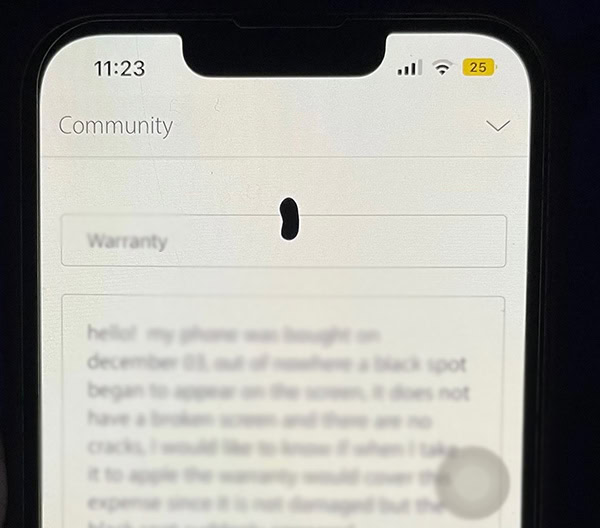
For consumer devices like smartphones and laptops, black spots are often linked to:
- Dead or stuck pixels: Tiny transistors in the display stop functioning.
- Physical pressure or impact: Dropping the device or pressing the screen too hard can damage internal layers.
- Moisture damage: Humidity or liquid exposure causes short circuits.
- Burn-in or backlight failure: Common in OLED or older LCD panels.
LED Display Panels (Commercial/Modular)
When it comes to large-format LED displays, black spots usually result from:
- Faulty LED modules or driver ICs
- Signal cable disconnection
- Power supply issues
- Moisture ingress, especially in outdoor installations
- Environmental overheating or dust buildup
At YUCHIP, we’ve seen outdoor LED screens experience blackouts within a week due to improper waterproofing. That’s why we always recommend IP65-rated modules or above.
Unlike mobile screens, LED displays are modular—you can often replace just the faulty section instead of the entire panel.
How to Fix Black Spots on Mobile Phone Screens
Black spots on mobile screens are frustrating but not always permanent.
Try These DIY Fixes
- Pixel repair apps: Apps like Dead Pixel Fix or LCD Fixer rapidly cycle colors to reactivate stuck pixels (works for LCD, not OLED).
- Clean your screen: Sometimes dirt, fingerprints, or screen protectors can create the illusion of black spots.
Note: Avoid using the pressure technique on OLED screens or cracked displays—it may cause further damage. DIY fixes typically only help with stuck pixels. For dead pixels or physical damage, professional repair is recommended.
When DIY Doesn’t Work
- Visit a certified repair shop.
- If the screen is cracked or unresponsive, replacement is usually the best option.
Tip: If your phone is under warranty and the black spot appeared without external damage, the repair may be covered for free.
How to Fix Black Spots on Laptop Screens
Laptop displays are more complex, but repair is still possible in many cases.

Step 1: Run a Pixel Test
Use tools like Dead Pixel Buddy or online test grids to detect stuck or dead pixels.
Step 2: Software Checks
- Update display drivers
- Check resolution and refresh rate settings
- Run hardware diagnostics (for Dell, Lenovo, HP, etc.)
Step 3: Physical Inspection
- Pressure marks: May require full screen replacement
- Moisture damage: Black areas might spread over time
In most cases, screen replacement is the most cost-effective long-term solution.
People Also Ask:
Q: Can I fix black spots on display (my laptop screen) without replacing it?
A: You can try software resets and pixel tests, but if it’s hardware damage, replacement is necessary.
How to Fix Black Spots on LED Displays
Now let’s talk about what YUCHIP does best—LED display panels. Black spots on LED screens typically point to pixel failure, module issues, or power/signal interruption.
Troubleshooting Steps
- Visually inspect the cabinet: Check for damage, moisture, loose parts
- Swap modules: Replace the affected LED module with a working one
- Inspect flat cables and ribbon lines: Loose/broken cables can cause issues
- Test the power supply: Voltage fluctuations may lead to blackouts
- Check receiving card/controller settings: Firmware or configuration errors can affect output
When to Replace the LED Module
- Multiple adjacent pixels are dead
- Cleaning connections doesn’t help
- The problem persists after swapping with a known-good module
Unlike laptops or mobile screens, LED displays are modular. At YUCHIP, we support commercial clients with module-level replacements, and rapid remote diagnostics—saving time and cost.
Need help now? Contact YUCHIP for a free diagnostic or explore our LED Repair Services for tailored support.
Can Black Spots Be Prevented?
Yes—prevention is often easier and cheaper than repairs.
For Phones and Laptops
- Use screen protectors and shockproof cases
- Avoid pressing too hard or dropping the device
- Keep away from water and extreme heat
For LED Displays
- Use waterproof enclosures for outdoor screens (IP65 or above)
- Ensure proper ventilation to avoid overheating
- Schedule routine inspections of modules and power supplies
- Choose robust, reliable components like YUCHIP’s SMD or COB modules
Black Spots on Display-Repair or Replace: Which Is Better?
When dealing with black spots, your decision depends on the device type, cost, and severity.
| Device | Repair Cost | Replacement Cost | Recommended Action |
| Smartphone | $50–$100 | $100–$300 | Replace if cracked/unresponsive |
| Laptop | $100–$200 | $300+ | Repair for minor spots |
| LED Display Module | $30–$80/module | Varies by cabinet | Replace faulty modules |
Summary Tips:
- For phones: Cracked or badly damaged screens are often best replaced.
- For laptops: Small black areas? Repair. Large damage? Replace.
- For LED displays: Swap only the broken module—don’t replace the entire cabinet.
If your LED display shows multiple black zones or frequent issues, consider upgrading to a higher refresh rate and more durable configuration to extend its lifespan.
[Explore: How To Improve My LED Screen Refresh Rate]
Final Thoughts
Black spots on display screens don’t always mean disaster. Whether it’s a stuck pixel on your phone, pressure damage on a laptop, or a faulty module on your LED wall—most cases have reliable solutions.
At YUCHIP, we don’t just sell LED displays—we offer lifetime technical support, reliable spare modules, and custom diagnostics for all types of projects. Need help? Contact YUCHIP Todayfor professional advice or to schedule your LED screen repair.
FAQs
1.What causes black spots on my phone screen?
Pixel failure, impact damage, moisture, or screen burn-in.
2.Can black spots disappear on their own?
Stuck pixels might recover, but dead pixels or pressure damage rarely do.
3.How do I fix black patches on my laptop screen?
Try pixel tests and driver updates. If the spot spreads or affects usability, replace the screen.
4.What about LED displays?
Check cables, modules, and power supply. YUCHIP offers replacement parts, expert diagnostics, and service support.
Related Articles You May Like:
How To Repair A Transparent LED Screen
LED Display Flickering: Causes and Quick Fixes
How To Reduce My LED Screen Power Consumption?
How To Choose The Best LED Display Cabinet Material?
What You Need to Know About LED Screen Maintenance
Bright Spot on LED TV or Display Screen: Causes and Fixes
Why Is Proper Heat Dissipation Crucial For LED Display Performance?