
Introduction
When people compare IPS vs LED displays, they often assume they are choosing between two competing screen technologies. In reality, this comparison is one of the most misunderstood topics in display selection.
Short answer: IPS is a type of LCD panel technology, while LED refers to the backlighting used in LCD screens. Most modern monitors are actually IPS panels with LED backlights, which is why the comparison can be confusing.
IPS describes how images are produced at the panel level, while LED refers to how the screen is illuminated. That means IPS and LED are not direct alternatives—and in most modern monitors, they actually work together.
So why does this comparison still matter? Because depending on what you care about—color accuracy, brightness, viewing comfort, power efficiency, or long-term usage—the balance between IPS panels and LED backlighting can significantly affect real-world performance.
In this guide, we’ll break down what IPS and LED really mean, compare their strengths in practical scenarios like gaming and professional work, and help you decide which setup makes the most sense for your needs in 2026.
IPS vs LED: Why This Comparison Is Often Misunderstood
IPS and LED are not two competing display technologies—they play completely different roles in how a screen works. One defines how images are displayed, while the other controls how those images are lit.
- IPS relates to the panel technology, focusing on color accuracy, grayscale perfomance, and wide viewing angles.
- LED refers to the backlighting method, which improves brightness, energy efficiency, and overall reliability.
IPS Technology-What Is an IPS Monitor?
IPS stands for In-Plane Switching, a type of LCD panel technology often referred to as “Super TFT.” In IPS displays, both electrodes are on the same plane, allowing liquid crystal molecules to align horizontally. This alignment maintains image stability and color accuracy even under physical pressure.
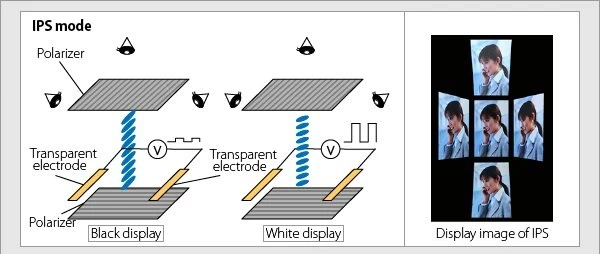
IPS Technology Example
Key Features of IPS Technology:
- Excellent Color Accuracy: Covers up to 99% sRGB or 95% Adobe RGB for professional photo/video editing. This level of color accuracy ensures consistent tones across different screens, which is critical for color-sensitive workflows.
- Wide Viewing Angles (up to 178°): Minimal color and brightness shift from any angle.
- Touch-Friendly and Durable: Resists ripple effects, ideal for touchscreens and interactive displays.
- Energy Efficient: Horizontal crystal alignment allows more light to pass, reducing backlight power usage by up to 15% compared to older LCDs.
- High Detail and Grayscale Performance: 8–10 bit panels deliver smooth gradations and fine detail for professional editing.
- Applications: IPS monitors are ideal for graphic designers, video editors, and multi-user workstations.
LED Technology-What Is an LED Monitor?
LED stands for Light Emitting Diode, referring to the backlight source used in many modern LCD monitors. LEDs replaced older CCFL (cold cathode fluorescent lamp) backlights, offering higher brightness, energy efficiency, and longer lifespan.
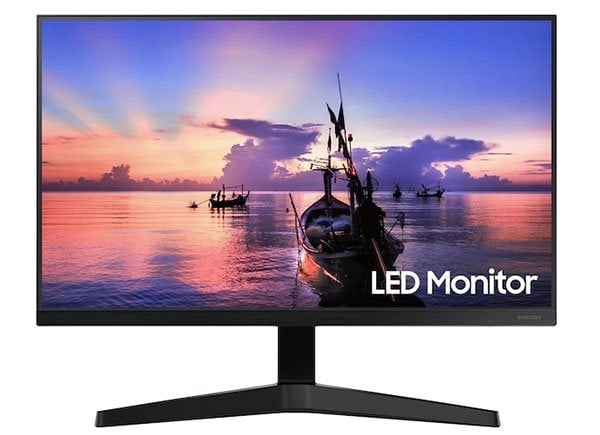
LED Monitor
Key Features of LED Technology:
- High Brightness: Can reach 400–1000 nits, suitable for bright rooms or outdoor kiosks.
- Energy Saving: LED backlights consume less power and support brightnessadjustments to reduce energy use.
- Longer Lifespan: LEDs can last 50,000–100,000 hours depending on usage.
- Great Contrast and Color Vibrancy: Ideal for multimedia, signage, and digital billboards.
- Lower Cost: Widely available in various sizes from 21” to 98” for commercial or home use.
- Applications: LED monitors are suitable for offices, classrooms, and casual gaming, while LED technology is also used in large commercial displays, but in the context of this comparison, we are focusing on LED-backlit LCD monitors commonly used in homes and offices.
Key Takeaway
IPS and LED are complementary: most modern displays combine both—e.g., an IPS panel with LED backlight. Comparing IPS vs LED is often comparing panel quality vs. backlight method, not two opposing technologies.
IPS vs LED Monitor: Quick Comparison Table
If you’re deciding between IPS and LED and just want a quick, side-by-side view, the table below highlights the most practical differences—color accuracy, brightness, power efficiency, and where each option actually performs best.
| Feature | IPS (LCD Panel Type) | LED-Backlit LCD Monitor |
| Technology Type | LCD panel technology | LED backlighting method used in LCD monitors |
| Color Accuracy | Excellent – true-to-life color reproduction | Good – depends on panel |
| Viewing Angles | Wide – minimal color shift | Narrower (around 160° for TN/VA) |
| Brightness | Moderate (250-350 nits typical) | Higher (400-1000 nits) |
| Power Efficiency | Slightly lower than LED-backlit displays | High – supports local dimming and brightness control |
| Response Time | 4 – 8 ms | 1–5 ms (TN/VA, direct-lit) |
| Use Case | Photo/video editing, office work | General monitors, TVs, bright-room setups |
| Cost | Generally higher | Can vary depending on panel and type |
IPS vs LED Monitor: Key Differences Explained
Brightness and Contrast
LED-backlit monitors generally achieve higher brightness (up to 1000 nits), making them ideal for bright indoor environments. IPS panels maintain consistent color and moderate brightness, which works best in controlled lighting conditions. IPS panels maintain consistent color and moderate brightness, best for controlled indoor environments. This makes LED-based solutions more suitable for environments with strong ambient light or long daily operating hours.
Color Accuracy
IPS panels excel in color fidelity and grayscale performance, essential for professional designers and video editors. LED monitors using TN or VA panels may have uneven backlight or color shift, though advanced full-array LED panels can partially close this gap.
Viewing Angle
IPS offers ultra-wide 178° angles. LED monitors often provide narrower angles (~160°), which can result in color/brightness shifts off-center.
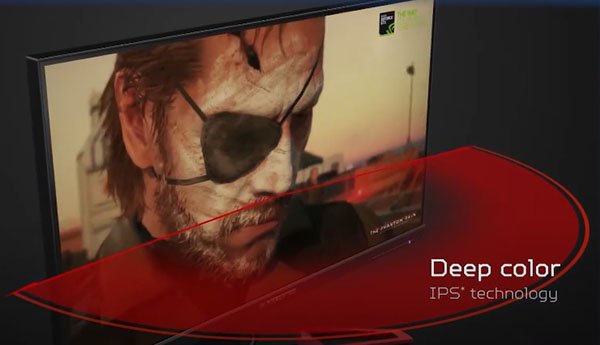
IPS VS LED Monitor-Viewing Angles
Power Consumption
LED monitors are energy-efficient, especially with dynamic backlight and local dimming. Power consumption depends more on brightness levels and backlight design than on IPS panel technology itself.
Image Transmission & Refresh Stability
High-end LED displays, especially those using direct-lit or advanced backlight control, often handle fast-moving content more effectively, while IPS panels prioritize image consistency and sharpness.
Durability & Lifespan
LED monitors last longer and resist environmental stress, ideal for public or commercial displays. LED-backlit monitors typically offer long operational lifespans due to efficient backlight systems. IPS panels are equally durable in standard indoor use, but brightness levels and thermal management can affect long-term performance.
Price
IPS monitors are higher priced due to superior color and viewing angles. LED monitors vary widely depending on panel type and application.
Summary
While both technologies have their strengths, the best choice depends on your specific needs. Choose an IPS monitor if you’re prioritizing color precision and viewing consistency. Go with an LED monitor if you value brightness, power efficiency, durability, and cost-effectiveness—especially for signage or high-use environments.
Compare IPS Vs LED Display In Different Aspects
IPS vs LED For Gaming
Response time and refresh rate matter most. LED-backlit TN or VA panels may offer slightly faster response times (1–5 ms), while modern IPS gaming monitors now achieve 1–4 ms with high refresh rates.
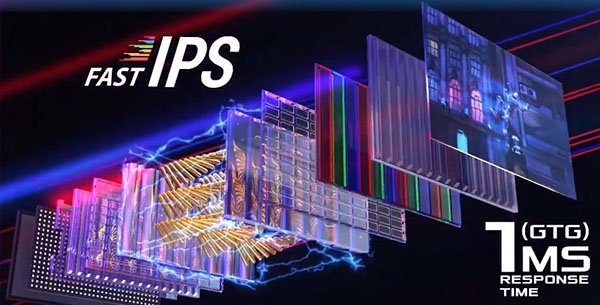
IPS Response Time
LED vs IPS For Professional Use
IPS is the choice for photo/video editing and design work. LED-backlit IPS monitors can also provide high brightness without losing color accuracy, making them ideal for studios and offices.
IPS vs LED For Daily Use
Both are suitable. Choose LED for energy saving, high brightness, and cost-effectiveness; choose IPS for color fidelity and multi-angle viewing.
Is IPS Better Than LED?
IPS is not inherently better than LED because they describe different components of a display. IPS defines how the panel controls color accuracy and viewing angles, while LED defines how the screen is illuminated.
For most users buying a monitor, an IPS panel with LED backlighting offers the best balance of color performance, brightness, and energy efficiency. The better choice depends on whether you prioritize color precision, gaming speed, or budget.
Future Trends: IPS and LED Displays
Looking ahead, both IPS and LED display technologies will continue to evolve, but in different directions. In recent years, these developments have accelerated, especially in commercial display and large-screen applications. IPS panels are expected to keep improving in terms of color accuracy, refresh rates, and energy efficiency. With the rise of 8K resolution and HDR standards, IPS may find a strong position in professional fields like content creation, medical imaging, and industries where precise visuals are critical.
On the other hand, LED technology—especially in the form of Mini LED and Micro LED—is shaping the future of larger displays. These advancements allow for thinner panels, deeper contrast, and higher brightness levels, making them ideal for immersive video walls, gaming monitors, and next-generation televisions. Micro LED, in particular, is seen as a breakthrough that combines the self-emissive benefits of OLED with the durability and brightness of LED.
In short, IPS will likely remain the go-to choice for professionals who value stable and accurate visuals, while LED innovations will dominate in areas that demand bigger screens, richer contrast, and longer lifespan. As the two paths develop, the decision between IPS and LED will become less about “better or worse,” and more about which fits your future needs.
Last updated: February 2026
Conclusion
Choosing between IPS vs LED is less about which technology is better, and more about which combination fits your usage scenario.
- Prioritize IPS for color accuracy, wide viewing angles, and image stability—essential for photo editing, video production, or design work.
- Choose LED especially for bright rooms, long daily use, or budget-friendly setups.
Many modern displays combine IPS panels with LED backlights, offering the advantages of both technologies.
When choosing between IPS and LED, remember that most modern monitors combine both technologies. Understanding the difference between panel type and backlighting will help you make a more informed decision based on your real usage needs.
FAQs
1.Is IPS better than LED for eyes?
Yes, IPS displays are more comfortable for long-term use due to stable colors and wide viewing angles. LED backlight brightness and flicker also affect eye comfort.
2.Can a display be both IPS and LED?
Absolutely. IPS refers to the panel type, LED to the backlight. Most modern monitors are IPS-LED.
3.Which is better for gaming: IPS or LED?
IPS gives better colors and wide angles; LED-backlit TN/VA panels may have faster response times. High-end IPS panels now offer 1–4 ms for competitive gaming.
4.Do IPS screens consume more power than LED?
Generally slightly higher, but IPS-LED combinations are energy efficient, especially with dynamic dimming.
5.Which display lasts longer?
LED displays are more durable and energy-efficient; IPS panels maintain color fidelity but may have slightly shorter lifespan in high-brightness conditions.
6.Can LED displays be used outdoors?
Yes, high-brightness LED panels are ideal for outdoor signage, stadium screens, and kiosks. IPS alone is usually for indoor use.
7.What is the best combination for professionals?
IPS panels with LED backlight offer color accuracy, high brightness, and long-term reliability—best for studios and professional setups.
Related Articles You May Like:
IPS vs VA: Which Panel Should You Choose?
IPS vs OLED: Which Display Technology Should You Choose?
Mini LED vs IPS: Which Display Technology Is Better for You?
IPS vs LCD: What’s the Difference & Which Should You Choose?