
Introduction
Grayscale affects how smoothly an LED display reproduces changes from dark to bright. It influences shadow detail, tonal transitions, and color consistency, especially when the screen operates at low brightness.
For buyers, a higher grayscale specification does not automatically mean better image quality. The driver IC, display configuration, brightness settings, calibration, and overall system performance all matter.
This guide explains how grayscale works, what affects real-world performance, and how to evaluate it before choosing an LED display.
Last Updated: October 2026
What Is Grayscale in an LED Display?
Grayscale is the range of brightness levels a display can reproduce between black and its maximum output. It helps an LED screen show subtle differences in shadows, skin tones, dark scenes, and gradients.
Each pixel contains red, green, and blue LEDs. By controlling the output of these three colors at different levels, the display produces a wide range of colors and brightness values.
Grayscale Levels and Bit Depth
Bit depth describes the number of digital levels available for each color channel. The following table shows the theoretical levels per channel at different bit depths.
| Bit depth per channel | Theoretical levels per channel |
| 8-bit | 256 |
| 10-bit | 1,024 |
| 12-bit | 4,096 |
| 14-bit | 16,384 |
| 16-bit | 65,536 |
These figures describe the available digital levels, not the number of visibly distinct shades a complete LED display can reproduce under every condition.
The final image also depends on how the display processes and outputs those levels. A system with a higher bit-depth specification may still show banding, crushed shadows, or color shifts if its low-gray performance is poor.
How Grayscale Affects LED Display Image Quality
Smooth Gradients and Color Banding
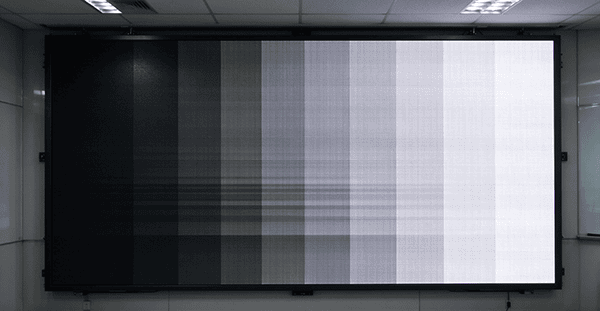
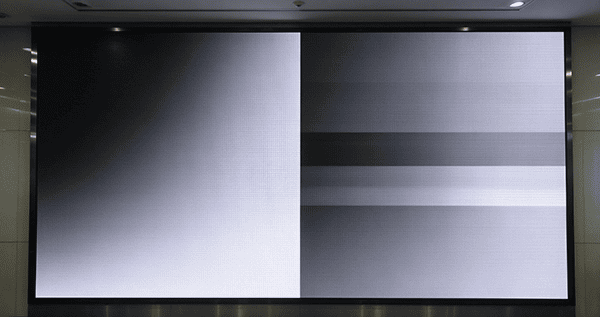
A smooth gradient should transition gradually from dark to bright. When the display cannot reproduce these transitions well, visible steps or bands may appear instead of a continuous change.
This problem is known as grayscale banding. It can be noticeable in dark backgrounds, sunset scenes, studio content, and other images with gradual tonal changes.
Banding can result from limited source content, signal processing, grayscale output limitations, or incorrect display settings. It is not always caused by the LED display itself, so the full signal chain should be checked.
Shadow Detail and Low-Gray Performance
Low-gray performance describes how well a display reproduces subtle details in darker parts of an image, particularly when overall brightness is low.
Poor low-gray performance may cause:
- Dark areas to lose detail and appear almost black.
- Gradients to break into visible steps.
- Neutral gray areas to develop a reddish, greenish, or bluish tint.
- Different areas of the screen to show inconsistent dark tones.
These problems matter in applications such as broadcast studios, control rooms, conference rooms, and fine-pitch indoor displays, where viewers may notice small changes in tone and color.
A display should therefore be evaluated at the brightness level at which it will actually operate, not only at maximum brightness.
Grayscale Uniformity and Color Shifts
A screen may reproduce a gradient smoothly in one area but show different shades in another. This can happen when modules or cabinets do not produce consistent output at low gray levels.
Calibration can help correct differences in brightness and color, but it cannot necessarily eliminate every limitation caused by the hardware or display configuration.
When evaluating a large LED wall, check both the gradient itself and the consistency of gray tones across module and cabinet boundaries.
What Affects Real-World Grayscale Performance?
A higher grayscale specification does not guarantee better image quality. The source signal, processing chain, driver configuration, operating brightness, and calibration must all support the intended output.
Grayscale Bit Depth vs. Actual Output
The bit-depth figure is only one part of the picture. Buyers should check how the display handles low-gray levels, whether fine tonal changes remain visible, and whether colors stay consistent at low brightness.
It is also important to distinguish between a driver’s supported grayscale mode and the performance of a complete LED display. A component’s specification does not, by itself, prove the visible result of the assembled screen.
LED Driver IC and PWM Control
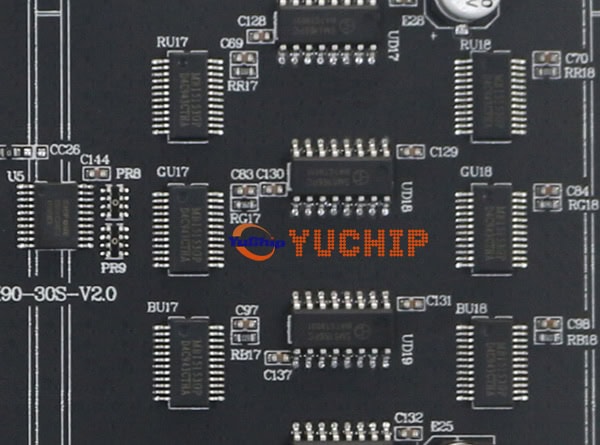
The LED driver IC controls how the LEDs receive current and reproduce the image signal. Its design and configuration can affect grayscale output, low-brightness color consistency, and refresh behavior.
Pulse-width modulation (PWM) is one method used to control LED output. Different driver architectures and control techniques manage the timing of LED illumination in different ways, which can influence image quality at low gray levels.
For example, Macroblock’s published specifications for the MBI5253 list selectable 13-bit and 14-bit grayscale control, S-PWM technology, and functions related to low-gray performance. Its MBI5292 belongs to the DaVinci series, which lists additional low-gray refresh and grayscale-control features, including a PAM+PWM 19-bit grayscale engine. These are manufacturer-published component specifications, not independent measurements of every display that uses those chips. (MBI5253 specifications; MBI5292 specifications)
The practical lesson is to look beyond the chip model or bit-depth figure alone. The final result depends on the complete display configuration, including the driver IC, scan architecture, control system, LED modules, operating brightness, and calibration.
When comparing suppliers, ask which driver IC is used, which grayscale mode is configured, and whether the complete display has been tested for low-gray detail, color consistency, and smooth tonal transitions.
Brightness, Gamma, and Calibration
Brightness settings and gamma processing affect how image levels are mapped to the screen’s output. If the settings are unsuitable for the content or viewing conditions, dark details may become difficult to distinguish or tonal transitions may appear uneven.
Calibration helps align brightness and color across the display. For a large LED wall, calibration should consider the consistency of individual modules and cabinets, not just the overall image.
For this reason, grayscale should be evaluated using the intended controller settings and operating brightness whenever possible.
LED Modules and Cabinet-to-Cabinet Consistency
The complete display is only as consistent as its components and configuration allow. Differences between modules or cabinets can become more noticeable in dark gray patterns than in bright, colorful content.
For large installations, ask the supplier how module and cabinet consistency is checked, how calibration is handled, and what process is used if visible differences remain after installation.
Grayscale vs. Refresh Rate: What’s the Difference?
Grayscale and refresh rate affect different aspects of image quality. They are related in some driver architectures, but they are not interchangeable specifications.
Grayscale is only one part of LED display image quality. Pixel pitch and resolution also affect how clearly an image appears at a given screen size and viewing distance. Read our guide to Pixel Pitch vs Resolution to understand how these specifications work together.
| Specification | What it describes | What to check |
| Grayscale bit depth | Available digital brightness levels | Whether tonal transitions and dark details are reproduced clearly |
| Refresh rate | How frequently the display refreshes its image | Whether flicker or camera artifacts appear under the intended conditions |
| PWM and scan architecture | How LED output is controlled and scanned | Whether low-brightness performance remains stable in the actual configuration |
A high refresh rate does not automatically guarantee smooth grayscale. Likewise, a high bit-depth specification does not guarantee that a screen will perform well on camera.
If your project involves filming, broadcasting, or photographing an LED wall, evaluate grayscale and refresh behavior together at the intended brightness and camera settings.
For a more detailed explanation, see YUCHIP’s guide to LED Display Refresh Rate.
How to Test LED Display Grayscale Before Buying
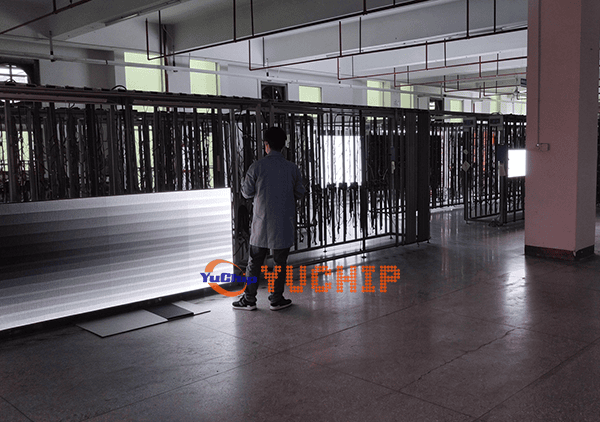
Before approving an LED display, evaluate its image quality using test patterns and content that reflect your actual application. A specification sheet alone cannot show how the complete screen performs.
Four Practical Checks
1.Test smooth gradients
Display a grayscale gradient that transitions gradually from black to white. Look for visible bands, abrupt steps, or uneven transitions.
2.Check dark details at low brightness
Use dark scenes and low-gray patterns at the brightness level expected during normal operation. Check whether shadow details remain visible and whether dark areas develop unwanted color tints.
3.Check uniformity across the screen
Display neutral gray patterns and inspect the center, edges, and boundaries between modules or cabinets. Look for differences in brightness or color.
4.Test with your actual content and camera, if relevant
For broadcast, studio, or event applications, test with the intended source equipment and camera settings. Camera shutter speed, frame rate, exposure, and display settings can all affect what appears in recorded footage.
Questions to Ask Your LED Display Supplier
Before placing an order, ask the supplier:
- What grayscale bit depth and driver IC are used in the proposed configuration?
- How does the display perform with low-gray patterns at reduced brightness?
- Can you provide a video or demonstration of the actual display running these tests?
- How are brightness and color differences between modules and cabinets checked?
- If the display will be filmed, can it be tested with our intended camera settings?
Requesting a demonstration or test video is more useful than comparing headline specifications alone. If the project has strict image-quality requirements, agree on the test conditions and acceptance criteria before production or final approval.
Display performance requirements can also affect the overall project cost. Before choosing a higher specification, consider whether it provides a meaningful benefit for your application. Our guide to LED Screen Price explains the main factors that influence the cost of an LED display.
How to Choose Grayscale Performance for Your LED Display Project
The required grayscale performance depends on the content, viewing conditions, and consequences of visible image defects.
| Application | What to prioritize |
| Broadcast and virtual production | Smooth gradients, low-gray color consistency, and camera performance |
| Control rooms | Dark-scene detail and consistent gray tones during extended operation |
| Conference rooms | Natural skin tones, readable dark content, and smooth transitions |
| Fine-pitch indoor displays | Uniformity, subtle tonal detail, and consistent output across the screen |
| Outdoor advertising | Performance at the intended operating brightness, with attention to the actual content and viewing conditions |
For projects with demanding image-quality requirements, request a demonstration using representative content rather than relying on bit depth alone. For outdoor advertising or other applications dominated by bright content, grayscale still matters, but it should be assessed alongside brightness, viewing distance, and the intended content.
The goal is not simply to choose the highest number on a specification sheet. It is to choose a display that reproduces the content clearly and consistently under real operating conditions.
Conclusion
Grayscale is an important part of LED display image quality, particularly when content contains dark scenes, subtle gradients, or fine tonal detail. However, bit depth alone cannot tell you how well a screen will perform.
When comparing LED displays, look at the complete configuration and test the actual screen at its intended brightness. Smooth gradients, clear shadow detail, consistent gray tones, and reliable results under real operating conditions provide a more useful basis for evaluation than a single specification figure.
If you are selecting an LED display for a project with specific image-quality requirements, contact YUCHIP to discuss your application and display configuration.
FAQs
1.Does a higher grayscale bit depth always mean better image quality?
No. Higher bit depth provides more theoretical digital levels, but the complete display must reproduce those levels effectively. Driver technology, system configuration, brightness, signal processing, and calibration all affect the visible result.
2.Can calibration fix poor grayscale performance?
Calibration can improve brightness and color consistency, including differences between modules and cabinets. However, it cannot necessarily overcome every limitation in the hardware or display configuration. The screen should be tested before final approval.
3.What should I ask a supplier about low-gray performance?
Ask for the driver IC and configured grayscale mode, then request a demonstration using low-gray patterns at your intended operating brightness. Check for lost shadow detail, color shifts, visible banding, and uneven gray tones across the display.
4.Is grayscale the same as color depth?
No. Grayscale describes the range of brightness levels between black and white. Color depth describes how much digital information is available to represent color. For RGB displays, bit depth is commonly specified per color channel, while the resulting image quality depends on how the complete system processes and reproduces those values.