
Try the LED Viewing Distance Calculator Now
Before diving deeper, try our LED Viewing Distance Calculator. Simply input your screen width and pixel pitch, and instantly get the recommended viewing distance!
Related LED Calculators
Pixel Density Calculator (PPI)–Calculate your display’s pixels per inch.
Introduction
Choosing the right LED screen is essential for creating a perfect viewing experience. A key factor to consider is the LED viewing distance—the optimal distance between the screen and the viewer. Whether you’re setting up a screen for your home, office, or outdoor event, standing at the right distance ensures a clear, vibrant picture. If you are too close, and pixels may become noticeable; too far, and the image may lose sharpness.
To simplify this process, we’ve developed an LED Viewing Distance Calculator, an online tool that helps you find the perfect viewing distance in seconds. Read on to understand why viewing distance matters and how you can use our tool to achieve the best results.
What is LED Viewing Distance?
LED viewing distance refers to the ideal distance from which viewers can enjoy clear, sharp images without noticing individual pixels or experiencing visual discomfort. Factors like pixel pitch, screen size, and resolution play a crucial role in determining the best distance. Generally, larger LED screens require a farther viewing distance, while smaller pixel pitches (such as 0.6mm to 2.5mm) are suitable for close viewing. If you’re unsure of the best viewing distance for your LED screen, our LED Viewing Distance Calculator can help you find the perfect spot!
Key Factors Affecting LED Viewing Distance
Pixel Pitch
Pixel pitch is the distance between individual pixels on the screen, measured in millimeters (mm). It directly determines how close you can stand to the screen without noticing the pixels.
- Smaller Pixel Pitch (e.g., 1.5mm, 2mm): Allows for closer viewing distances.
- Larger Pixel Pitch (g., 4mm, 5mm): Requires standing farther away to avoid pixelation.
Screen Size
The size of your screen also affects the viewing distance. Larger screens cover more of your field of view, generally requiring a greater distance for clarity.
Screen Resolution
The resolution of your screen also plays a role in determining the viewing distance. So understand LED display resolution is very important. A higher-resolution display allows you to sit closer to the screen without sacrificing image quality. Here’s how different resolutions compare:
- 1080p: The most common resolution, ideal for mid-range screens. You need to sit farther away for clarity.
- 4K: This high-resolution screen allows for closer viewing without noticeable pixelation.
- 8K: With the highest resolution, you can sit even closer to the screen while still enjoying exceptional image quality.
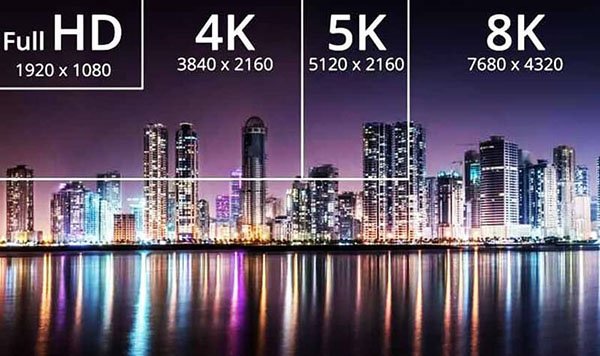
LED Screen Resolution
Viewing Environment
Where you place your screen matters, especially for large or outdoor LED displays. For example:
- Indoor Use: Indoor LED screens, especially those with smaller pixel pitches, can be viewed from closer distances (around 5-8 feet for smaller screens).
- Outdoor Use: Outdoor LED displaystypically have larger pixel pitches and need to be viewed from much farther distances (typically 10-20 feet or more).
Viewer Comfort
While the technical aspects of viewing distance are important, comfort is key. Being too close to a screen can cause eye strain, while being too far away might make it hard to appreciate the full resolution and vibrancy of the display. The ideal distance ensures both clear visuals and a comfortable viewing experience.
How to Calculate LED Viewing Distance Using Our Tool
Our LED Viewing Distance Calculator makes it simple to find the best viewing distance. Just follow three easy steps. Here’s how it works:
1.Input Pixel Pitch: Provide the pixel pitch (e.g., 4.81) from your screen’s specifications.
2.Input Screen Width: Enter the width of your LED screen (e.g., 10m).

3.Get Results: The tool instantly calculates the minimum and maximum viewing distances for your setup.

For example, if you enter a 10m wide screen with a 4.81mm pixel pitch, the tool will calculate the best viewing distance and the farthest viewing distance.
Summary of Calculator Logic
Best Viewing Distance Formula
The best viewing distance based on the pixel pitch, this is the closest distance where individual pixels won’t be noticeable.
Formula:
Best Viewing Distance (m) = Pixel Pitch (mm) × 1000 ÷ 1000
Farthest Viewing Distance Formula
Farthest Viewing Distance based on the screen width, this is the farthest point where the screen remains fully visible and impactful. A widely used approximation for this is to multiply the screen width by a constant factor. The constant factor might vary depending on the text or image size on the screen. In our calculator, the constant factor is 5.
Formula:
Farthest Viewing Distance (m) = Screen Width (m) × 5
Why Do We Use a Constant Factor of 5?
Many calculators use higher constants like 20 or 25 to calculate the farthest viewing distance for LED screens. While these values work in some cases, they aren’t always practical. Here’s why we use a constant factor of 5, and how it benefits you:
- Works for Real-World Use
A constant factor of 5 is ideal for most applications, such as outdoor advertising or public displays. It ensures that text, images, and videos are clear and easy to see, without needing extreme detail that might not be necessary.
- Provides Reliable Results
Using a higher constant like 20 or 25 can overestimate how far your audience can stand and still see the screen clearly. This might make the screen seem effective at impractical distances. By using 5, we give you more accurate and useful recommendations that ensure the best viewing experience.
- Keeps Up With LED Technology
Modern LED screens are brighter and have better resolution, so they don’t need overly large viewing distances to look great. A constant of 5 is enough to deliver sharp and vibrant visuals, even from a distance, without complicating your setup.
By using a practical and tested formula, we aim to provide results that help you make confident decisions about your LED screen setup.
Why is Viewing Distance Important?
The viewing distance significantly impacts your screen’s overall performance and your visual comfort. If you are too close, the pixels may become noticeable, disrupting the viewing experience. On the other hand, standing too far may result in a blurry or less immersive image.
Here’s why the right viewing distance matters:
- Clarity: The right distance ensures you won’t see individual pixels, preserving the sharpness and detail of the screen.
- Comfort: Sitting at the optimal distance reduces eye strain, letting you enjoy long viewing sessions comfortably.
- Visual Impact: The ideal distance lets you appreciate the screen’s colors, contrast, and resolution to the fullest.
FAQs About LED Viewing Distance
1.Can I use the calculator for both indoor and outdoor screens?
Absolutely! The calculator works for both indoor and outdoor LED screens. Outdoor screens generally require larger viewing distances due to their size and pixel pitch.
2. Can LED screen viewing distance be adjusted?
While the pixel pitch and screen size determine the best viewing distance, you can optimize the viewer’s experience by adjusting the screen’s brightness and contrast settings. However, the pixel pitch should always be selected based on how far the audience will be from the screen for the best results.
3.How far should I stand from a 55-inch LED screen?
For a 55-inch screen, the optimal viewing distance is 5-8 feet, depending on the pixel pitch and resolution. If your screen is 4K, you can stand closer without compromising clarity.
Conclusion
The right viewing distance ensures the best visuals from your LED screen. Use our LED Viewing Distance Calculator to determine the perfect spot for your setup and experience the sharpest, most vibrant images effortlessly. If you need help and want to inquire about LED viewing distance, please message us at manager@yuchip.com.
Related Articles:
LED Screen Grayscale And Its Impact On Image Quality
The Ultimate Guide To Optimal LED Screen Viewing Angle