
Introduction
If you’re planning to buy an LED display, you’ve probably see the terms pixel pitch and pixel density. While they may sound similar, they represent two different concepts that play an essential role in determining your screen’s clarity, image quality, and viewing distance. In this article, we’ll explore pixel pitch vs pixel density, explain their key differences, how they affect your display performance, and guide you on choosing the right specifications for your project.
What Is Pixel Pitch?
Pixel pitch refers to the distance between the centers of two adjacent pixels on an LED display. Usually in millimeters. It’s often written as “P” followed by a number, such as P2.5, P5, or P10.
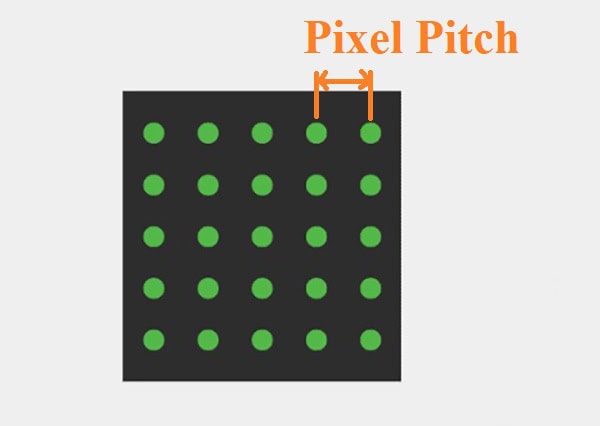
Key Points About Pixel Pitch:
- It’s a physical measurementof the distance between pixels.
- A smaller pixel pitchmeans more pixels are packed closely together, producing sharper and clearer images.
- A larger pixel pitchtypically means a lower-resolution screen but more cost-effective for large viewing distances.
Formula:
Pixel Pitch = Distance between centers of two adjacent LEDs (in mm)
What Is Pixel Density?
Pixel density refers to the number of pixels in a given area, usually expressed as pixels per square meter (pixels/m²). It indicates how many pixels are present on the LED panel or display area.
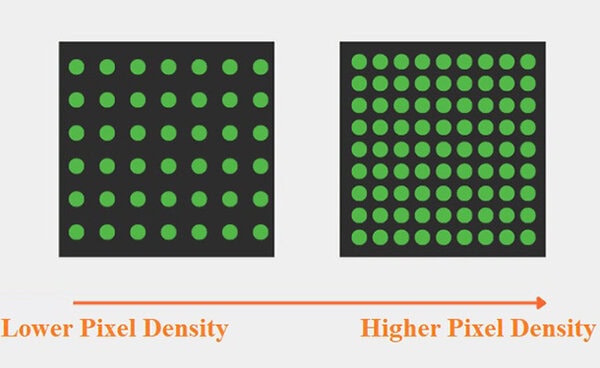
Key Points About Pixel Density:
- It’s a numerical measureof how tightly packed the pixels are.
- Higher pixel density = more detail and clarity.
- Lower pixel density = less detail, suitable for distant viewing.
Formula (approximate for LED screens):
Pixel Density = (1000 / Pixel Pitch)²
For example, a P2.5 display has roughly: (1000 / 2.5)² = 160,000 pixels/m²
Whereas a P10 display has only about: (1000 / 10)² = 10,000 pixels/m²
Key Differences Between Pixel Pitch vs Pixel Density
While pixel pitch and pixel density are closely related, they are not the same thing. Understanding their difference helps you make smarter decisions when buying an LED screen.
Definition and Measurement
- Pixel Pitchis a linear measurement — the space between two pixels, in millimeters.
- Pixel Densityis an area-based measurement — how many pixels fit into a square meter or inch.
Key point: Pitch is spacing. Density is quantity.
Mathematical Relationship
Pixel density is approximately inversely proportional to the square of the pixel pitch, assuming uniform grid layout.That means when pixel pitch is reduced by half, pixel density increases four times.
Example:
P2: ~250,000 px/m²
P4: ~62,500 px/m²
So even a small reduction in pitch leads to a big jump in pixel density.
Key point: Smaller pitch = much higher pixel density.
Impact on Image Quality
- Pixel Pitchdetermines how smooth or sharp the image looks from a certain viewing distance.
- Pixel Densityaffects how much detail the screen can show within a fixed space.
Summary: Pitch = clarity from distance; Density = detail in design.
Appearance in Specifications
- Pixel pitch is always listed (e.g., P2.5, P3.91).
- Pixel density might not appear but can be calculated.
Ask your supplier for both values, especially if image clarity is important for your use case.
Application and Use
- Pixel pitch tells you how close viewers can get before they start noticing individual pixels.
- Pixel density helps compare image detail qualityin similar screen sizes.
Example: Two 4m² displays—
P2 = 1 million pixels
P4 = 250,000 pixels
The P2 screen will display much sharper content.
Technical vs Visual Understanding
- Pixel pitch is easy to see — you can visually notice the spacingon a screen.
- Pixel density is a calculated technical spec, not visible to the naked eye.
Installers may care about pitch. Engineers and designers often consider density.
Cost and Performance Impact
Smaller pixel pitch (and therefore higher density) means more LED chips, higher processing power, and more expensive materials. This leads to higher cost, more power use, and potential heat generation. Choose based on your actual needs — not just the best numbers.
Pixel Pitch vs Pixel Density: Quick Comparison Table
As you can see, pixel pitch and pixel density work together to determine your LED screen’s clarity, resolution, and cost. So the quick comparison table can help you see it clearly:
| Feature | Pixel Pitch | Pixel Density |
| Definition | Distance between adjacent pixels | Number of pixels per square meter |
| Unit of Measurement | Millimeters (mm) | Pixels/m² |
| Indicates | Physical spacing of pixels | Pixel concentration on screen area |
| Smaller Value Means | Higher resolution, shorter viewing | More detail and clarity |
| Larger Value Means | Lower resolution, longer viewing | Fewer pixels, less detail |
| Use In Product Specs | Labeled as P1.5, P2.6, P3, etc. | Sometimes calculated from pitch |
| Viewer-Friendly? | Yes, easier to understand visually | More technical, often used by engineers |
How Pixel Pitch Affects Image Quality
A lower pixel pitch (like P1.8 or P2.5) means pixels are closer together, which provides high resolution and clearer images, especially important for close-up viewing. That’s why small pitch displays are commonly used in:
- Retail shops
- Control rooms
- Broadcast studios
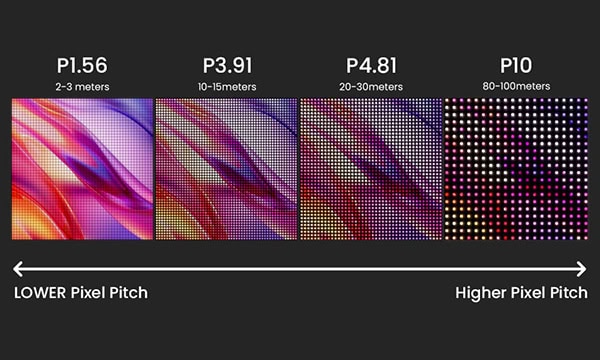
In contrast, large pixel pitches (like P8 or P10) are more affordable and best viewed from a distance, making them suitable for:
- Stadium LED screens
- Outdoor billboards
- Highway displays
How Pixel Density Impacts Detail
Pixel density gives you a sense of how packed the pixels are across a surface. The higher the density, the better the screen handles fine details, even for small texts or intricate images. This is especially relevant for high-end indoor LED displays, where audiences stand close to the screen and expect excellent image quality.
Pixel Pitch vs Pixel Density: How Do They Work Together
Pixel pitch and pixel density are mathematically connected — as pixel pitch decreases, pixel density increases. However, each term highlights a different aspect:
- Pixel pitchis great for visualizing pixel layout and comparing models (e.g., P2 vs P4).
- Pixel densityis useful when calculating display sharpness or matching performance across different screen sizes.
Let’s say you’re comparing two displays:
- A P2.5 LED display has 160,000 pixels/m²
- A P5 LED display has only 40,000 pixels/m²
That’s a 4x difference in pixel density, even though the pixel pitch only doubled — showing how significant the effect is on image clarity.
Choosing the Right Pixel Pitch and Pixel Density
So, how do you decide which one is right for your LED screen project? It depends on a few key factors:
Viewing Distance
This is the most important consideration. As a general rule:
- For indoor screens, you want small pixel pitch (P1.5–P3)and high pixel density for close-up views.
- For outdoor or long-distance viewing, P6–P10might be enough.
Minimum Viewing Distance ≈ Pixel Pitch (in mm) × 2 or 3 (in meters)
E.g., P3 → Best viewed from ~6–9 meters away
Budget
- Lower pixel pitch and higher density= higher cost
- Higher pitchscreens cost less and cover more area per module
Try to balance budget and clarity by matching your screen’s usage location and expected viewing range.
Content Type
If your content includes small fonts, product visuals, or fine patterns → go for high density
For bold ads or live event video feeds → lower density may still look great
Ask the Right Questions Before Buying
When getting LED screen quotes or comparing models, don’t just stop at pixel pitch. Ask your supplier for both values. Also, consider asking:
- What’s the screen’s minimum viewing distance?
- How does the pixel density compareacross options?
- What’s the total resolutionfor the desired screen size?
Here’s a reference table:
| Pixel Pitch | Pixel Density (px/m²) | Best Use Case |
| P1.5 | ~444,444 | TV studios, boardrooms |
| P2.5 | ~160,000 | Indoor retail displays |
| P4 | ~62,500 | Indoor events |
| P6 | ~27,777 | Outdoor signage |
Final Thoughts
Understanding the difference between pixel pitch vs pixel density is essential when buying or recommending an LED display. While they’re closely related, they serve different purposes:
- Pixel pitchgives you an idea of how closely the LEDs are spaced — crucial for estimating ideal viewing distance and clarity.
- Pixel densityhelps you measure how much visual detail a screen can display per square meter.
Both are critical for choosing the right LED screen based on your application, whether it’s indoor signage, an outdoor billboard, or a massive video wall. So next time you see a screen labeled “P2.5”, you’ll know what it means — and how it affects your display’s performance. If you are still confused, you can contact our team to help you choose the suitable pixel pitch or pixel density for your needs.
FAQs
1.Which is more important, pixel pitch or pixel density?
Both are important. Pixel pitch is easier to compare across models, while pixel density gives a clearer idea of display detail. Ideally, use both together.
2.Does pixel density affect screen brightness?
Not directly. Brightness depends more on the type of LED used, but very high-density screens may appear dimmer if not properly designed.
3.Can two screens have the same pixel pitch but different pixel densities?
Generally no — since density is derived from pixel pitch. However, module layout or screen size might affect the total pixel count.
4.What’s better for outdoor use — higher pitch or higher density?
For outdoor use, a higher pixel pitch (like P6–P10) is more cost-effective and works well at longer viewing distances.
Related Articles You May Like:
What Is Pixel Density? An In-depth Guide
Pixel Pitch vs Resolution: What’s the Difference?
Why Does Color Accuracy Matter In LED Screens?
Aspect Ratio Of LED Display Screens: An In-Depth Guide
How Does Color Depth Affect The Image Quality Of LED Displays?