
Introduction
When choosing an LED display, two specifications appear again and again: pixel pitch and resolution.
They are closely related, but they are not the same thing.
Pixel pitch tells you how far apart the LED pixels are physically. Resolution tells you how many pixels the display contains horizontally and vertically. A smaller pixel pitch generally allows more pixels to fit into the same physical area, but the final resolution also depends on the screen size and cabinet configuration.
This becomes especially important when you move from a theoretical calculation to a real LED display. Unlike a conventional television, a large LED screen is normally assembled from individual modules and cabinets. The physical cabinet dimensions therefore affect the final screen size, pixel resolution, and even how closely the display can match a target such as 16:9 or 4K.
In this guide, we will look at the relationship between pixel pitch and resolution using real LED cabinet specifications and project examples.
Last Updated: October 2026
What Is Pixel Pitch?
Pixel pitch is the distance from the center of one LED pixel to the center of the next, measured in millimeters.
For example:
- P1.25= 1.25 mm pixel pitch
- P1.56= 1.56 mm pixel pitch
- P2.5= 2.5 mm pixel pitch
- P4.81= 4.81 mm pixel pitch
The smaller the number, the more closely the pixels are packed together.
For the same physical screen size, a P1.25 display therefore contains substantially more pixels than a P2.5 display.
Pixel pitch is particularly important when the audience will be relatively close to the screen or when the content contains fine text, detailed graphics, spreadsheets, camera feeds, or other high-resolution information.
However, pixel pitch alone does not tell you the final resolution of an LED screen.
What Is LED Display Resolution?
Resolution describes the number of pixels across the display and the number of pixels vertically.
For example:
- 1920 × 1080 = 1920 pixels wide × 1080 pixels high
- 2560 × 1440 = 2560 pixels wide × 1440 pixels high
- 3840 × 2160 = 3840 pixels wide × 2160 pixels high
The higher the pixel count, the more image information the display can reproduce.
But there is an important point that is sometimes overlooked:
A physical LED screen does not automatically have a standard resolution just because its aspect ratio is 16:9.
A 16:9 LED screen can have many different pixel resolutions depending on its physical dimensions and pixel pitch.
This is why pixel pitch, physical screen size, and resolution should always be considered together.
For more detail, see our guide to LED Display Resolution.
How Are Pixel Pitch and Resolution Connected?
The basic relationship is straightforward:
Smaller pixel pitch → more pixels per square meter
Larger pixel pitch → fewer pixels per square meter
But resolution depends on both pixel density and physical screen dimensions.
Same Screen Size, Different Pixel Pitch
Imagine two LED displays with exactly the same physical dimensions:
3 m × 2 m
If one uses P2.5 and the other uses P1.25, the P1.25 display places pixels much closer together.
As a simplified calculation:
For P2.5:
3 m ÷ 0.0025 m = approximately 1200 pixels horizontally
2 m ÷ 0.0025 m = approximately 800 pixels vertically
So the theoretical pixel matrix is approximately:
1200 × 800
For P1.25:
3 m ÷ 0.00125 m = approximately 2400 pixels horizontally
2 m ÷ 0.00125 m = approximately 1600 pixels vertically
So the theoretical pixel matrix is approximately:
2400 × 1600
The physical screen size has not changed, but the pixel resolution has.
This is why a smaller pixel pitch can produce a much denser image on the same screen area.
Same Resolution, Different Pixel Pitch
The relationship works in the opposite direction as well.
Suppose the target resolution is:
3840 × 2160 (4K)
A P1.25 screen can reach this resolution at a much smaller physical size than a P2.5 screen because it contains more pixels per unit of area.
Using theoretical calculations:
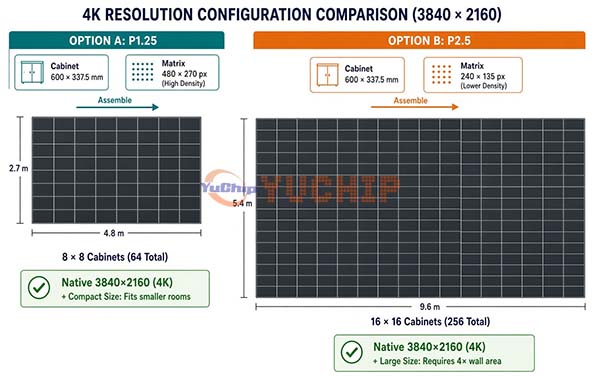
- P1.25 → approximately 4.8 × 2.7 m for 3840 × 2160
- P2.5 → approximately 9.6 × 5.4 m for 3840 × 2160
The two displays have the same pixel resolution, but very different physical sizes.
This is one of the most important distinctions between pixel pitch and resolution:
Pixel pitch describes pixel spacing. Resolution describes pixel count. Screen size determines how those pixels are distributed physically.
From Pixel Pitch to a Real LED Screen: Why Cabinet Size Matters
The calculations above are useful for understanding the relationship, but they are still theoretical.
When you actually build an LED display, the screen has to be assembled from real cabinets.
Unlike a conventional LCD panel manufactured as one continuous piece, a modular LED display is normally constructed from multiple LED cabinets. The cabinet dimensions therefore influence the final physical dimensions and pixel matrix.
This is where the difference between an online calculator and real LED engineering becomes important.
How Cabinet Resolution Is Calculated
Take a real YUCHIP example.
The FinPIX Air Series uses a cabinet measuring:
600 × 337.5 mm
The cabinet itself has a 16:9 proportion. Depending on the pixel pitch, however, the number of pixels inside that same physical cabinet changes.
For example:
| Specification | P1.25 | P2.5 |
| Cabinet size | 600 × 337.5 mm | 600 × 337.5 mm |
| Cabinet resolution | 480 × 270 | 240 × 135 |
| Pixel density | Higher | Lower |
The cabinet dimensions are identical, but the P1.25 version contains twice as many pixels horizontally and vertically.
That means:
480 × 270 = 129,600 pixels per cabinet
while:
240 × 135 = 32,400 pixels per cabinet
So the P1.25 cabinet contains 4 times as many pixels as the P2.5 cabinet.
This is a much more useful way to understand pixel pitch than simply memorizing that “smaller pitch means higher resolution.”
Real 4K Example: P1.25 vs P2.5
Now let us take the same YUCHIP cabinet and see what happens when we design a true 4K display.
The target is:
3840 × 2160 pixels
P1.25 Configuration
Each P1.25 cabinet provides:
480 × 270 pixels
Horizontally:
3840 ÷ 480 = 8 cabinets
Vertically:
2160 ÷ 270 = 8 cabinets
So the display requires:
8 × 8 = 64 cabinets
The physical size becomes:
8 × 600 mm = 4800 mm
8 × 337.5 mm = 2700 mm
Final screen size:
4.8 × 2.7 m
And the final resolution is:
3840 × 2160
P2.5 Configuration
Each P2.5 cabinet provides:
240 × 135 pixels
Horizontally:
3840 ÷ 240 = 16 cabinets
Vertically:
2160 ÷ 135 = 16 cabinets
So the display requires:
16 × 16 = 256 cabinets
The physical size becomes:
16 × 600 mm = 9600 mm
16 × 337.5 mm = 5400 mm
Final screen size:
9.6 × 5.4 m
And the final resolution is again:
3840 × 2160
What Does This Tell You?
| P1.25 | P2.5 | |
| Cabinet resolution | 480 × 270 | 240 × 135 |
| Cabinets for 4K | 8 × 8 | 16 × 16 |
| Total cabinets | 64 | 256 |
| Physical screen | 4.8 × 2.7 m | 9.6 × 5.4 m |
| Final resolution | 3840 × 2160 | 3840 × 2160 |
This is a real engineering relationship, not just a theoretical example.
With the same 600 × 337.5 mm cabinet format, the P2.5 configuration needs four times as many cabinets to reach the same 4K pixel count because each cabinet contains only one-quarter as many pixels.
It also demonstrates something important for buyers:
A “4K LED screen” does not tell you the pixel pitch by itself.
Two LED displays can both deliver 4K resolution while having very different physical dimensions and pixel pitches.
Pixel Pitch vs Resolution: The Key Differences
| Specification | Pixel Pitch | Resolution |
| What it describes | Distance between pixels | Total pixel dimensions |
| Unit | mm | Pixels |
| Example | P1.25, P2.5 | 1920 × 1080, 3840 × 2160 |
| Smaller value means | Pixels are closer together | Not directly applicable |
| Main influence | Pixel density and viewing distance | Image detail and pixel count |
| Depends on | LED package arrangement | Screen size + pixel pitch |
A common mistake is to treat the two specifications as interchangeable.
They are not.
You can have:
- small pixel pitch + relatively small screen + high resolution;
- small pixel pitch + large screen + very high resolution;
- larger pixel pitch + large screen + 4K resolution.
The correct combination depends on the project.
How Pixel Pitch Affects Viewing Distance
Pixel pitch also has a strong relationship with viewing distance.
As the viewing distance increases, the individual pixels become less distinguishable to the viewer. As the viewing distance decreases, a smaller pixel pitch becomes more important.
For example, a P1.25 display is generally more appropriate for close viewing than a P4.81 display.
However, it is better not to treat formulas such as “1 mm pixel pitch = 1 meter viewing distance” as a universal rule.
Actual viewing requirements depend on factors including:
- content type;
- text size;
- viewer eyesight;
- screen brightness;
- contrast;
- LED package technology;
- installation environment;
whether the screen is being viewed continuously or occasionally.
A practical starting point is to compare the intended minimum viewing distance with the pixel pitch, then evaluate the actual content and display technology.
For a more detailed explanation, see our guide to Pixel Pitch vs Viewing Distance.
Pixel Density: The Missing Link
There is another concept that helps explain the relationship between pixel pitch and resolution: pixel density.
Pixel density refers to how many pixels are packed into a given physical area.
When pixel pitch is reduced, pixel density increases significantly.
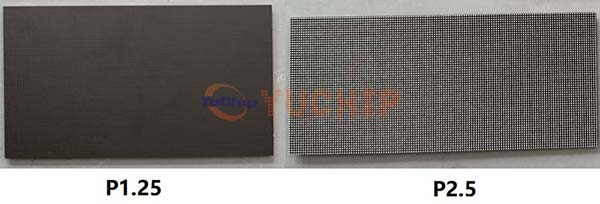
For example, moving from P2.5 to P1.25 does not simply double the pixel density.
Because the pitch is reduced by half in both the horizontal and vertical directions, the number of pixels per square meter increases by approximately:
2 × 2 = 4 times
That is why a P1.25 cabinet can contain four times as many pixels as a P2.5 cabinet of the same dimensions.
You can learn more about this relationship in our guide to Pixel Pitch vs Pixel Density.
Why Smaller Pixel Pitch Usually Costs More
A smaller pixel pitch generally requires more LED pixels and more supporting electronics in the same physical area.
That can affect:
- LED package quantity;
- PCB design;
- driver IC requirements;
- power distribution;
- manufacturing;
- calibration;
- testing;
- module and cabinet cost.
However, 4× the pixel density does not mean 4× the total project price.
For example, moving from P2.5 to P1.25 can increase the number of pixels per square meter by four times, but the complete LED project also includes cabinets, control systems, structure, power systems, installation, transportation, and other components.
So pixel pitch should be considered as one part of the total project cost rather than using pixel density as a direct price multiplier.
For a broader breakdown of LED project costs, see our guide to LED Screen Price.
Real-World YUCHIP Example: P1.25 for a Monitoring Display
The relationship between pixel pitch and resolution becomes even clearer when looking at a real project.
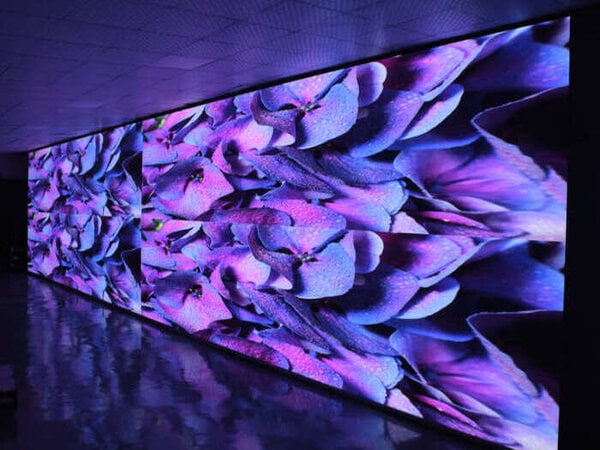
YUCHIP supplied a P1.25 COB LED screen for a gas company in Denmark. The display was designed for monitoring applications and covered approximately 56 square meters. The project used 600 × 337.5 mm cabinets.
This type of application is a good example of why fine pixel pitch is not selected simply because “higher resolution is better.”
A monitoring display may contain:
- multiple video feeds;
- detailed images;
- small text;
- graphs and data;
- control information;
- long viewing periods.
In such applications, pixel density and image detail can directly affect how comfortably users can read and interpret information.
Common Misconceptions About Pixel Pitch and Resolution
1.Smaller Pixel Pitch Always Means Higher Resolution
Not necessarily.
A P1.25 display can have lower total resolution than a P2.5 display if the P1.25 screen is physically much smaller.
Resolution depends on both pixel pitch and physical screen dimensions.
2.A 4K LED Screen Must Use a Specific Pixel Pitch
No.
As the cabinet example above shows, different pixel pitches can achieve the same 3840 × 2160 resolution at different physical sizes.
3.16:9 Automatically Means 1920 × 1080
No.
16:9 describes the shape of the display, not its pixel count.
A 16:9 screen can be 1920 × 1080, 2560 × 1440, 3840 × 2160, or another proportional resolution.
4.Halving Pixel Pitch Automatically Quadruples Project Cost
No.
Halving the pitch can increase pixel density by approximately four times, but total project cost depends on many other components and engineering requirements.
5.The Theoretical Screen Size Is Always the Final Screen Size
Not necessarily.
A mathematical calculation may produce an ideal dimension, but the final LED display needs to be assembled using actual cabinets and modules.
Cabinet dimensions can therefore affect the final physical size and aspect ratio.
How to Choose the Right Pixel Pitch and Resolution
Instead of starting with a specification such as “I need 4K,” look at the complete project.
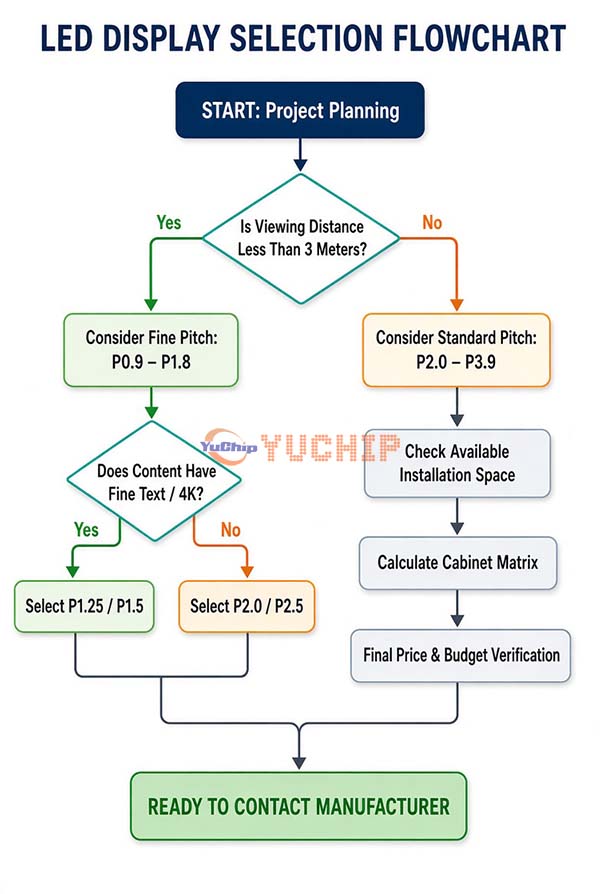
1.Start With Viewing Distance
Determine the closest and typical viewing positions.
A fine-pitch display is more valuable when viewers are close enough to see the additional pixel density.
2.Define the Content
Consider what will actually appear on the screen.
Is it mainly:
- video?
- presentations?
- text?
- spreadsheets?
- camera feeds?
- advertising graphics?
- detailed data?
The more detailed the content and the closer the viewer, the more important pixel density becomes.
3.Measure the Available Space
The physical installation area determines how large the display can be.
Do not choose pixel pitch or resolution without considering the available width and height.
4.Check the Actual Cabinet Configuration
Ask your LED supplier for:
- cabinet dimensions;
- cabinet resolution;
- cabinet matrix;
- total cabinet quantity;
- final screen dimensions;
- final pixel resolution.
This is where a professional LED quotation should go beyond simply listing a pixel pitch.
5.Check the Required Resolution
If your application requires 4K content, calculate whether the planned LED configuration can actually reproduce a 3840 × 2160 pixel canvas.
Do not assume that a product labeled “4K compatible” automatically means the LED surface itself contains 3840 × 2160 pixels.
6.Consider Cost as Part of the Decision
A smaller pixel pitch can improve image detail, but you should pay for the pixel density you can actually use.
If viewers are far away, an extremely fine pitch may provide limited practical benefit compared with the additional investment.
Practical Checklist Before Buying an LED Display
Before confirming an LED display, ask your supplier these questions:
- What is the pixel pitch?
- What is the cabinet size?
- What is the resolution of one cabinet?
- How many cabinets are required?
- What will the final physical screen size be?
- What will the final pixel resolution be?
- What is the expected minimum viewing distance?
- What type of content will be displayed?
- Can the screen reproduce the required source resolution?
- Does the cabinet layout produce the required aspect ratio?
- What control system and video processor are required?
- What is included in the quoted project cost?
These questions help you evaluate the complete display rather than comparing pixel pitch alone.
Final Thoughts
Pixel pitch and resolution are closely connected, but they describe different things.
Pixel pitch tells you how closely the pixels are packed. Resolution tells you how many pixels the display contains. The physical size of the LED screen connects the two.
Real cabinet configuration makes this relationship even more important.
For example, YUCHIP’s 600 × 337.5 mm cabinet provides 480 × 270 pixels at P1.25 and 240 × 135 pixels at P2.5. Using the same cabinet format, a 4K P1.25 display can be built at 4.8 × 2.7 m with 64 cabinets, while a 4K P2.5 configuration would require 256 cabinets and reach 9.6 × 5.4 m.
This is why choosing an LED display should not start with a single specification.
The right combination of pixel pitch, physical size, resolution, viewing distance, cabinet configuration, content, and budget is what determines whether the final display is actually suitable for the project.
FAQs
1.Is pixel pitch the same as resolution?
No. Pixel pitch is the physical distance between adjacent pixels, while resolution is the number of pixels across and vertically on the display.
2.Does a smaller pixel pitch mean a higher resolution?
Not automatically. A smaller pixel pitch allows more pixels to fit into the same physical area, but total resolution also depends on the screen size.
3.Can two LED screens have the same resolution but different pixel pitches?
Yes. A smaller-pitch display can achieve the same resolution at a smaller physical size, while a larger-pitch display needs a larger physical area to contain the same number of pixels.
4.Can a P2.5 LED screen be 4K?
Yes. A P2.5 screen can achieve 3840 × 2160 if its physical dimensions and cabinet configuration provide enough pixels.
5.Does smaller pixel pitch always mean a better LED screen?
Not necessarily. Smaller pitch is beneficial when you need greater pixel density, closer viewing, or more detailed content. If the audience is far away, a larger pitch may provide a better balance between image quality and project cost.
6.What should I ask an LED manufacturer about resolution?
Ask for the cabinet resolution, final cabinet matrix, total pixel resolution, physical screen dimensions, pixel pitch, and viewing-distance recommendation. These details give you a much clearer picture of the actual display than pixel pitch alone.