
Introduction
When buying a display—whether it’s for a TV, computer monitor, or LED screen—you’ve likely seen terms like HD and UHD. But what do they really mean? Is the higher resolution always better? And how do you decide between UHD vs HD? This guide will explain the difference between UHD and HD in simple terms. We’ll also show how the resolution impacts image clarity, use cases, and most importantly, how to choose the right one for your needs—especially if you’re looking for an LED display.
What Is HD (720p)? A Simple Explanation
HD stands for High Definition, and it usually means a resolution of 1280 x 720 pixels, also known as 720p. It became the standard over older formats like SD (Standard Definition), offering clearer visuals and better overall video quality.

HD works well for:
- Smaller screens (below 32 inches)
- Content with simple graphics or text
- Applications where the audience views from far away (like street signs or billboards)
Many HD LED screens still exist in outdoor advertising, transportation, or simple retail setups because they are cost-effective and easy to install.
What Is UHD (4K)? Understanding Ultra High Definition
UHD stands for Ultra High Definition, and it typically refers to a resolution of 3840 x 2160 pixels—also known as 4K. This means four times more pixels than HD, resulting in much sharper images and richer details.
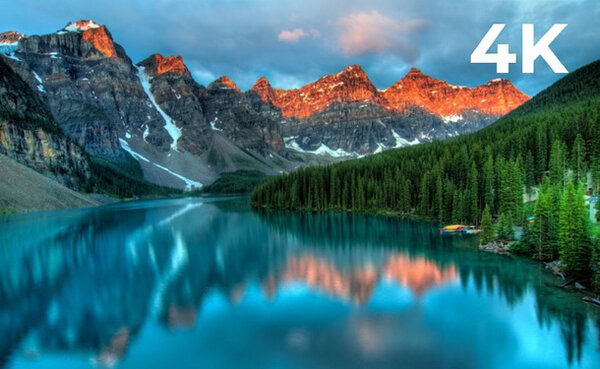
UHD is best used when:
- You want a very sharp, clear image
- Viewers will be close to the screen
- You’re showing detailed graphics, videos, or text
- You’re installing a high-end LED display or video wall
UHD delivers crystal-clear images, finer details, and more realistic visuals. It’s particularly noticeable on large screens (50 inches and above) or when viewed from a close distance. That’s why UHD is the standard for modern TVs, high-end monitors, and commercial-grade LED displays.
UHD vs HD: Quick Comparison Chart
Here’s a quick table to show the most important differences between UHD vs HD resolution:
| Feature | HD (720p) | UHD (4K) |
| Resolution | 1280 x 720 | 3840 x 2160 |
| Total Pixels | ~0.9 million | ~8.3 million |
| Image Quality | Moderate | Very sharp and detailed |
| Suitable Screen Size | < 32 inches | 40 inches and above |
| Ideal Viewing Distance | > 3 meters | < 2 meters |
| Content Type | Basic video, CCTV | 4K video, graphics, close-up views |
| Typical Use | Budget displays | Premium displays, LED video walls |
In-Depth UHD vs HD Comparison: Resolution, Clarity & More
Resolution and Pixel Count
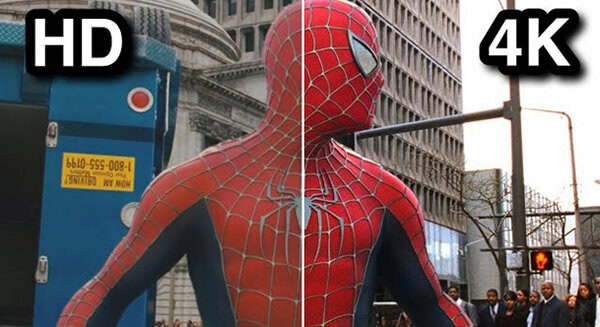
The biggest difference is in resolution. HD offers 720p, while UHD provides 2160p. UHD has over 8 million pixels, making it four times clearer than HD. This means UHD displays can show more detail and make everything—text, images, and video—look sharper and more realistic.
If you’re comparing HD vs UHD screen side by side, the UHD version will show smaller details that the HD screen can’t.
Image Clarity and Viewing Experience
When it comes to clarity:
- UHD is superior when viewers are sitting close or need to see fine details, such as in LED video wallsor control room displays.
- HD is good enough when the screen is far from the viewer—like in outdoor ads or large halls.
For presentations, close-range signage, or studio backdrops, UHD vs HD for LED display makes a big difference in how professional and modern your visuals appear.
Content Availability
- HD content is still more common—especially for cable TV, older videos, and online streaming at lower internet speeds.
- UHD content is growing fast, with 4K optionsavailable on platforms like YouTube, Netflix, and modern media players.
Even if your content is HD, most UHD screens can upscale it to look better, though it won’t be as sharp as true 4K.
Use Cases and Recommendations
- HD is suitable for smaller screens, casual viewing, or when cost is a concern. It’s still common in security monitors, budget LED panels, or digital menus.
- UHD is ideal for professional applications: high-end LED screens, immersive video walls, home theaters, or any environment where crisp visuals matter.
| Use Case | Best Resolution |
| Outdoor billboard | HD |
| Retail signage (close-up) | UHD |
| Control room LED screen | UHD |
| Digital menu board | HD or UHD |
| Museum or gallery display | UHD |
| Simple text or logos | HD |
If your audience is viewing from far away, HD may be enough. But for premium or detailed visual work, UHD is clearly better.
UHD vs HD for LED Displays
When it comes to LED displays, choosing between UHD and HD depends heavily on the pixel pitch and screen size.
- A UHD LED screen typically uses a pixel pitch under 2.5mm to reach true 4K resolution, especially in smaller screen sizes.
- HD LED walls often use pixel pitches of 0mm to 4.0mm, sufficient for viewing from a greater distance.
| Feature | HD LED Display | UHD LED Display |
| Pixel Pitch | P4.0 to P10.0+ | P1.2 to P2.5 |
| Viewing Distance | > 3–5 meters | < 2 meters |
| Image Detail | Moderate | Very high |
| Installation Location | Outdoor, long-distance | Indoor, close-view |
| Price | Lower | Higher |
So when choosing between UHD or HD for LED screen, consider the environment. For trade shows, meeting rooms, or exhibitions, UHD gives a better user experience. For traffic signage or outdoor advertising, HD often gets the job done.
Is UHD Always Better than HD?
Not necessarily. While UHD is technically superior, it’s not always the best choice in every environments.
- Cost: UHD screens, especially LED displays, are more expensive due to higher pixel density and advanced drivers.
- Bandwidth: Streaming or delivering UHD content requires faster connections and more storage.
- Perception: On a small 24″ monitor viewed from 8 feet away, you might not even notice the difference between HD and UHD.
So, UHD is not always necessary, particularly if your content is basic or your audience is far from the screen. In many cases, a well-calibrated HD screen delivers excellent performance for less.
UHD vs HD Buyer’s Guide: How to Choose the Right One
Still unsure about UHD vs HD? You can see this guide:
| Situation | Recommendation |
| Small screen, far viewing distance | HD |
| Large LED display for indoor event | UHD |
| Control center or command room | UHD |
| Outdoor billboard viewed 10m away | HD |
| Museum or gallery installation | UHD |
| Retail window display (close-up audience) | UHD |
| Display for basic text (bus/train signs) | HD |
Tips:
- Choose UHD if your screen is large, the viewing distance is short, or content quality is critical.
- Choose HD if you’re prioritizing cost, have limited internet bandwidth, or your audience views from afar.
So you should always balance budget, screen size, resolution, and viewing distance before making a final choice.
UHD vs HD in 2025: Key Trends You Should Know
In 2025, the gap between UHD and HD continues to evolve—especially in LED display technology. Thanks to advances in LED manufacturing, many UHD LED displays are now more affordable, even in small to medium sizes. P1.5 and below pixel pitches are becoming mainstream, making 4K resolution more accessible for retail stores, studios, churches, and exhibition halls.
Meanwhile, HD remains relevant in cost-sensitive environments, such as outdoor LED billboards, bus station displays, and transportation signage, where viewing distance is long and fine detail is less critical. HD content is also still dominant in legacy systems, public infrastructure, and basic streaming.
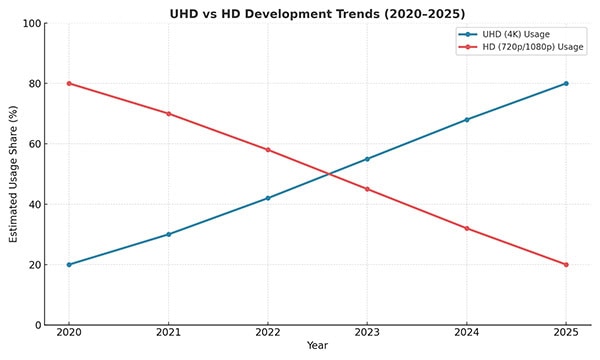
One major shift in 2025 is that more content platforms and playback devices are defaulting to UHD. Streaming services like YouTube and Netflix now offer 4K as the standard for premium accounts, and video production tools are optimized for UHD export.
For LED display buyers, this means UHD is no longer just a premium feature—it’s becoming the new norm. If your project requires crisp detail, short viewing distance, or high-end presentation, UHD is more justifiable than ever before.
Conclusion
Now you understand the main difference between UHD vs HD: it’s all about resolution, pixel count, and visual quality. UHD offers much better clarity and realism, especially for close-up viewing or professional displays. HD, on the other hand, is more budget-friendly and still performs well for many use cases.
Whether you’re choosing a TV, monitor, or LED screen, always consider how and where the screen will be used. If visual detail and close-range performance matter, UHD is the clear winner. But if you’re prioritizing price and distance viewing, HD can still be a smart, effective choice.
So we can see that there’s no one-size-fits-all answer. The right resolution depends on your unique display goals. If you need help choosing between UHD and HD for your LED project, you can contact us now—we’ll help you find the best LED display for your needs, whether you’re upgrading a stage screen, planning a control center, or launching a digital billboard.
FAQs
1.Is UHD the same as 4K?
Yes. In consumer displays, UHD (3840×2160) is often called 4K, though technically cinema 4K is slightly wider (4096×2160).
2.Can I play HD content on a UHD screen?
Yes, UHD screens can upscale HD content, but it won’t look as sharp as native UHD content.
3.Is UHD worth it for digital signage?
If your signage is seen up close or displays detailed visuals, UHD is definitely worth it.
4.What size screen is best for UHD?
UHD is most noticeable on screens 40 inches and larger, or LED screens with small pixel pitches (under P2.5).
5. Is UHD becoming the new standard in 2025?
Yes. With 4K content widely available and UHD LED displays more affordable, UHD is becoming the standard for many display applications.
6. Can HD still be used in professional LED projects?
Absolutely. HD is still used in outdoor billboards, long-view signage, and cost-sensitive installs where high resolution isn’t critical.
Related Articles You May Like:
Which Pixel Pitch LED Display Suits For Your Project?
What Is LED Display Resolution And Why Does It Matter?
FHD vs HD: Which Resolution is Better for Your LED Screen?
HD vs FHD vs QHD vs UHD: What’s the Difference in Display Resolutions?