
Introduction
When you’re shopping for an LED screen or working with digital displays, you’ve probably seen the term display frame rate. But what does it really mean, and why does it matter? In today’s digital world, screen quality isn’t just about resolution—it’s also about how smoothly content plays.
In this guide, we’ll explain what display frame rate is, how it differs from refresh rate, and why it plays a key role in your LED screen’s performance. Whether you’re a business owner investing in digital signage or an installer configuring a video wall, understanding display frame rate can help you make smarter decisions.
What Is Display Frame Rate?
Display frame rate refers to the number of individual images (frames) shown on a screen per second. It’s measured in frames per second (fps). For example, if your LED screen runs at 30fps, it’s showing 30 frames every second.
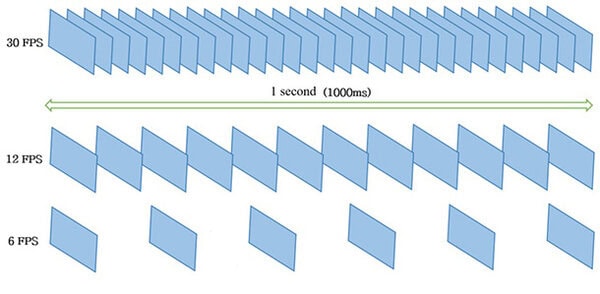
The higher the frame rate, the smoother the motion appears. This is especially important for fast-moving content such as sports, video ads, and gaming visuals. Lower frame rates can make motion look choppy or laggy, which negatively affects the viewing experience.
Let’s take a closer look at some common frame rates:
- 24fps– Standard for movies and cinema. It gives content a dramatic and filmic appearance.
- 30fps– Common for TV broadcasts and online video. It strikes a balance between quality and file size.
- 60fps– Used in high-quality video playback, live broadcasting, and gaming. It’s ideal for displaying fast action smoothly.
Interestingly, the human eye doesn’t see in “frames,” but it can perceive differences in motion quality. Most people can detect when content runs below 24fps, and many can appreciate the fluidity of 60fps or more.
Display Frame Rate vs Refresh Rate: What’s the Difference?
Although they sound similar, display frame rate and refresh rate are two different things.
- Display frame rate (fps) refers to how many frames the video content provides per second.
- Refresh rate (Hz) refers to how many times per second the screen refreshes the image.
Think of it like this: frame rate is about the content, and refresh rate is about the screen. If a video is produced at 30fps but shown on a 60Hz LED screen, the screen still refreshes 60 times per second—but it’s displaying only 30 new frames per second. The rest are duplicates.
This mismatch can cause problems. If the frame rate doesn’t match the refresh rate, you might see issues like:
- Screen tearing– When parts of two frames appear on the screen at once.
- Judder– Uneven playback, especially when converting 24fps to 60Hz.
Ideally, the two should align or be evenly divisible (e.g., 30fps on 60Hz) to reduce these artifacts. LED displays with intelligent controllers can help synchronize content playback more accurately.
→Want a more detailed breakdown? Read our in-depth comparison of refresh rate vs frame rate to learn how they work together in LED displays.
Why Display Frame Rate Matters for LED Screens?
For LED screens, especially in commercial or public settings, a proper display frame rate ensures:
- Smooth Playback: High frame rates create seamless video, improving viewer satisfaction and delivering a more professional appearance.
- Accurate Motion: Movements appear more natural and lifelike, which is essential for live events, sports, or dynamic ads.
- Lower Eye Strain: Flicker-free visuals make it easier and more comfortable for people to watch, especially over extended periods.
Studies show that smoother video motion increases viewer retention and engagement. For example, research in digital signage reveals that videos played at 60fps can keep viewer attention for 15–25% longer compared to 24fps or 30fps versions.
If your LED display is used for advertising, retail, or entertainment, optimizing the frame rate enhances your screen’s impact. A poor frame rate can make even a high-resolution screen look unprofessional, ultimately hurting your brand or message.
24fps, 30fps, 60fps: Which Frame Rate Fits Your LED Display?
Choosing the right frame rate depends on your content type, audience, and usage environment:
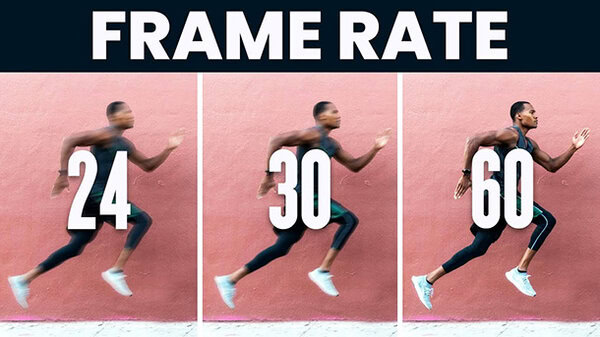
- 24fps: Best for cinematic visuals. It gives a classic, film-like look that many viewers associate with premium quality. Ideal for trailers, commercials, and artistic content.
- 30fps: Suitable for standard video and television formats. It offers good clarity and moderate file size, making it perfect for general-purpose screens in retail, hospitality, and indoor signage.
- 60fps: Excellent for fast-paced visuals—sports broadcasts, gaming demos, or interactive content. It ensures ultra-smooth motion and minimizes motion blur.
It’s worth noting that some advanced LED screens can support frame rates up to 120fps, which is becoming increasingly popular in immersive applications like AR/VR displays and high-end simulators.
Choosing the Right Frame Rate for Your LED Screen Setup
Here are some tips to help you choose the best LED screen frame rate for your setup:
- Consider the Source: Match the frame rate to the original video content. If your content is in 30fps, your screen should support that natively to avoid conversion artifacts.
- Know Your Audience: Will people be watching fast-moving sports or mostly still visuals and presentations? Match the frame rate to the motion level.
- Screen Size and Resolution: Larger, high-resolution screens benefit more from higher frame rates, especially if they’re viewed up close.
- Environment: Outdoor LED screens may benefit from higher frame rates to counteract environmental motion distractions (e.g., passing cars or crowds).
- Hardware Capability: Not all LED displays can handle high frame rates. Make sure your screen, processor, and media player are compatible.
If you’re working with a rental LED screen for events or trade shows, discuss frame rate options with your vendor in advance. Mismatched hardware can ruin the intended visual quality.
Frame Rate Optimization Tips for LED Screens
To get the best performance from your LED display frame rate:
- Use Compatible Media Players: Choose media players and controllers that support the same frame rate as your video content.
- Enable Frame Rate Syncing: Many LED controllers or processors offer settings to sync frame rate and refresh rate automatically.
- Avoid Frame Conversion: Changing frame rates (e.g., from 24fps to 30fps) can cause motion artifacts. Always render content in the target frame rate.
- Test Before Deploying: Run your actual content on the screen before going live to detect any tearing, judder, or dropped frames.
- Monitor Performance: Use diagnostic tools that check frame delivery and playback quality in real time.
Optimizing frame rate may take a bit of effort, but it ensures your LED screen delivers the highest possible quality to viewers.
Final Thoughts
Now that you understand what display frame rate is and how it impacts LED screen quality, you’re better equipped to choose, configure, or upgrade your display system. Frame rate is not just a technical setting—it’s a core factor that affects how your content is experienced.
Whether you’re displaying ads in a shopping mall, running video content at a trade show, or managing a stage backdrop for an event, don’t overlook display frame rate. Choosing and optimizing the right one can elevate your content and help your screen stand out. Need help selecting the right LED screen or frame rate configuration? Contact us today and let us guide you to the best display solution for your project.
FAQs
1.What is the ideal frame rate for LED displays?
For most uses, 30fps is standard and works well. For smoother motion, especially with fast-moving content, 60fps is ideal.
2.Can I use 24fps content on a 60Hz LED screen?
Yes, but you may need to adjust settings or use a video processor to avoid motion judder.
3.Is frame rate more important than resolution?
Both matter, but for motion clarity, frame rate is crucial. High resolution without a good frame rate can still result in poor playback.
4.Does a higher refresh rate improve frame rate?
Not directly. Refresh rate is how often the screen updates; frame rate depends on the video content. However, high refresh rates allow smoother display of high-frame-rate content.
5.How can I check the frame rate of my LED screen setup?
Use software tools, media player settings, or consult with your LED screen provider to verify frame rate settings.
Related Articles You May Like:
How To Improve My LED Screen Refresh Rate?
LED Display Flickering: Causes and Quick Fixes
1920Hz vs 3840Hz vs 7680Hz: A Comparison And Guide
LED Refresh Rate Explained: Why It Matters for Displays